
A digital signage Content Management System (CMS) acts as the central brain of a screen network, extending far beyond basic web builders to power device ecosystems, automate dynamic content, deliver emergency alerts, and keep multi-site deployments secure.
A content management system (CMS) is a term used in web development. Early websites were static and hand-coded from scratch. Then, software companies introduced applications that would help less technical users design and build websites and publish and manage content through an easy-to-use interface. These content management systems eventually evolved into web-based platforms such as Wix, Squarespace, and Shopify.
In digital signage, we often refer to our software as a CMS, but its capabilities extend far beyond content management. A digital signage CMS, like Carousel, is the central brain of a signage network. It helps designers build out layouts and templates while making it easy for others to create, schedule, and manage content. It's responsible for ensuring the content is delivered to the correct displays at the right time. A digital signage CMS also connects media players, displays, and other hardware and provides monitoring tools that show media player uptime, software updates, message impression counts, and more. It lets admins configure user permissions, allowing for a customized workflow and approval process. It supports third-party integrations such as the Common Alerting Protocol (CAP) and allows developers to access the system's built-in API. It also provides IT with the tools and protocols it needs to keep its networks secure and compliant.
Beyond the basics, the unique combination of features is what defines and separates the various platforms. Now let's take a look at what makes Carousel unique.
These are the capabilities we consider essential, and how we have built them into Carousel.

A signage network communicates with anyone who passes by a screen, so controlling who has access comes first. Carousel supports single sign-on through SAML 2.0, multi-factor authentication and passkeys, admin-configured authentications, secure player registration, and TLS-secured traffic between the cloud and every player.
Security posture is only as meaningful as the standard it is audited against. For how we approach that, see our overview of SOC 2 compliance and our security practices.

Screens lose their audience when the content stops changing, and no single person can keep a whole network current. Carousel spreads that work across the organization. User accounts are unlimited, so there is no licensing reason to limit who contributes. Roles apply to both users and zones, so Human Resources can manage its zone while Marketing manages another zone on the same screen (or on a different one). A user can hold as many roles as needed, and custom roles define what each one can do.

Building a bulletin shouldn't require a specialized skill set. A digital signage CMS should be built for everyone, offering intuitive templates for admins and casual users that automatically format content to match the organization's established look and feel. At the same time, it should empower users and designers with robust design tools and advanced customization options, ensuring they can create truly unique and engaging content. Beyond static messages, Carousel seamlessly integrates with popular design platforms like Canva. It offers powerful options for dynamic content, enabling users to pull in live data from calendars, dashboards, and other organizational tools. This ensures that content can stay fresh, relevant, and automatically updated without additional manual work. Scheduling, targeting, and analytics are built in, making it easy for any user to manage content effectively and measure its impact.

Carousel can hold submitted content until an administrator approves it. Approval is set per user and per zone, so administrators decide whose content goes live immediately and whose waits for review. That is what lets a network stay open to contributors while keeping messaging and brand consistent.

A message that only part of the audience can receive is not a message. Carousel's Content Accessibility Site extends on-screen content to personal devices, where viewers can read it using the assistive tools they already rely on, from screen readers to zoom and high contrast. Accessibility standards for digital signage are still taking shape, and Carousel is actively evolving the platform toward WCAG 2.1 Level AA so that communication reaches everyone.
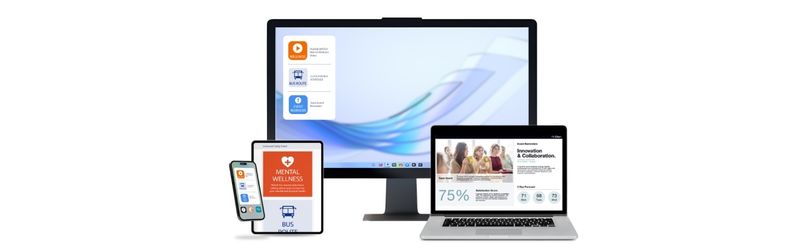
A CMS should work with the hardware an organization already owns and already trusts. Carousel works agnostically across multiple media players, including BrightSign, Apple TV, Amazon Signage Stick, Samsung Tizen, LG webOS, Sony, Philips, and Chrome Enterprise, plus content feeds for tablets, mobile devices, conference rooms, desktops, Windows screensavers, and more, all managed through a player dashboard with last check-in alerting, zero-touch configuration, and remote updates with device management tools for digital signage.
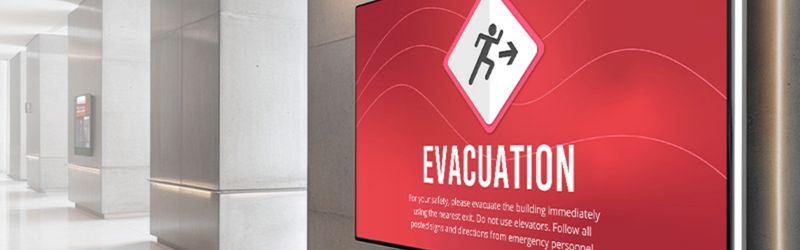
During an emergency, screens reach everyone in a building or campus at once, including people who are not carrying a phone or watching email. Carousel integrates with the Common Alerting Protocol (CAP) so a single trigger overrides scheduled content with full-screen alerts on the screens that need them.
On-screen alerts are one piece of a larger discipline. For how signage fits across mitigation, preparedness, response, and recovery, see our breakdown of the four phases of emergency management and our emergency messaging solutions.
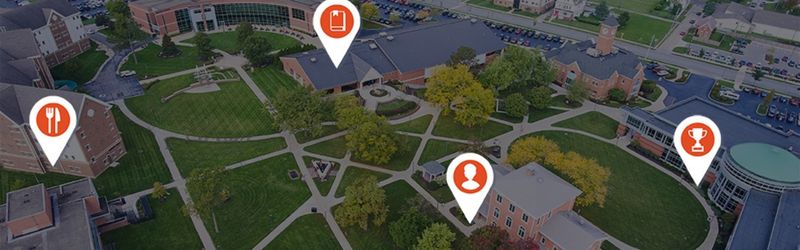
Scaling a network should be easy and not require infrastructure upgrades. Carousel Cloud is hosted, so adding screens and locations means that you can easily provision and register new devices. Channels and zones are unlimited, and growth can draw on devices already on the network, so a conference room display or an idle tablet becomes a signage endpoint without new hardware.
For a closer look at scaling a signage network across an enterprise, see our article, "Digital Signage as a Platform: How IT Leaders Scale It Across the Enterprise", and our approach to enterprise deployments.

Software is half of a CMS. The other half is the people who answer when it matters, which is why Carousel digital signage training, a Support Center, and the Creator Library are included with every subscription and are backed by a team that has been doing this for nearly 30 years. Depending on the Carousel plan, additional support is also available, and the Creative Services team can help design custom channels and templates.
A digital signage CMS is the central brain of a screen network. Every platform manages content, schedules it, sends it, watches it, and controls who touches it. What separates them is how much thought went into each job and whether the people behind the software are still there after the install.
For another perspective on weighing the options, Digital Signage Today covers the question in "What is the Best Digital Signage CMS and How to Choose Yours in 2026". To see how Carousel handles the nine pillars in practice, talk with our team.
A digital signage CMS is the software that controls what plays on a screen or a network of screens. It handles creating and scheduling content, sending it to the right displays, monitoring whether those displays are online and playing correctly, and managing who has permission to publish. One administrator can update a single lobby display or thousands of screens across dozens of locations from the same interface.
The terms are often used interchangeably, but a CMS specifically refers to the platform where content is created, scheduled, and managed. Digital signage software is a broader term that can also include the player software running on each device, design tools, and system utilities. Most platforms sold as digital signage software include a CMS at the center.
A network of that size can get away from you fast, so what matters are the features that keep it manageable at each stage. During installation and expansion, batch player registration provisions players in bulk instead of one at a time. Once screens are live, publishing to a single zone can update many screens showing it at once. Because many people across many sites share the system, roles that apply per user and per zone delegate control without losing oversight, and templates keep those local teams on brand. Channels and zones in Carousel are unlimited, so the system scales as the network grows.
Yes, if it supports dynamic content. Rather than uploading a screenshot, the CMS connects to the source and refreshes the display as the underlying data changes. Carousel integrates with tools including Power BI, Geckoboard, Google Sheets, and web-based dashboards, so operational metrics stay up to date on screen without anyone updating them.
An emergency alert works by overriding whatever is scheduled and taking over the affected screens immediately. Carousel integrates with the Common Alerting Protocol (CAP), the standard format used by emergency alerting systems. Hence, a single trigger from an existing alerting platform pushes a full-screen message to the screens that need it—targeting matters here because an alert should reach the affected building or region without disrupting the rest of the network.
It depends on the platform, which is why security belongs in the evaluation rather than after it. The questions worth asking are whether it supports single sign-on and multi-factor authentication, how traffic between the cloud and the players is encrypted, how players are registered, and what compliance standards the vendor is audited against. Carousel supports SAML 2.0 single sign-on, multi-factor authentication, passkeys, secure player registration, and TLS-secured traffic.
No. A well-built CMS gives casual contributors templates that format content automatically to the organization's look, while giving designers deeper tools when they need them. The people posting a lunch menu and the people building a branded campaign should be able to use the same system.
Some do; some require proprietary hardware. Carousel is player-agnostic and runs on BrightSign, Apple TV, Amazon Signage Stick, Samsung Tizen, LG webOS, Sony, Philips, and Chrome Enterprise, so signage can be deployed on devices already approved in the environment. Displays already on the network, like a conference room TV, can be brought in without new hardware.
Subscribe, learn and achieve ultimate success with your signage system:


